Jake Mammen, MS

Currently a Director/Operations Manager at a private emergency management company, leveraging geospatial intelligence and data-driven decision-making in high-stakes environments. Holder of a BS in Geography and MS in Geospatial Technology from the University of Oklahoma. Passionate about operations, data science, and GIS; aspiring to grow professionally at the intersection of these fields through innovative projects and analysis.
This portfolio features a curated selection of my research, academic projects, and applied experiences from my time in academia and early career, demonstrating core competencies in geospatial analysis, data science, and GIS applications. It highlights key geospatial and data science skills through interactive maps/dashboards, spatial/statistical analysis workflows, Python/R scripting for data processing and visualization and advanced GIS modeling—demonstrating practical applications of tools like Python, R, ArcGIS, QGIS, GDAL, PostGIS, and machine learning techniques for real-world geospatial challenges.
View My LinkedIn Profile
Spatial programming and GIS experience
Project description: This project uses a GIS framework to create a geoprocessing program that analyzes land suitability for wind turbines based off the impact certain factors such as environmental, ecological, cultural, human settlement, and physical infrastructure have on wind turbine placement. More specifically differences in wind speed; distances from a road network, urban areas, and differences in the topography of the land could prove to be the primary factors in determining land suitability for wind turbines across the United States. This project uses a GIS and programming approach to analyze various energy and geographic datasets. As a result, the various patterns are illustrated through the use of maps by determining wind turbine placement and in return provide some useful information for planners and engineers to aid in decision making.
Coding examples:
In order to perform geoprocessing techniques for this particular use case, we need to download the data first and make sure it was stored in a folder on the local computer. After data collection, four different geoprocessing tools were selected to carry out the analysis.
Clip Analysis:
# Description: Perform a clip of turbines or airports taking user input

# Import system modules
import arcpy

# Set environment or workspace settings
arcpy.env.workspace = r"C:\Users\user\folder\All_Data"

# Ask the user for input
clip_turbine_or_airport = input("Enter Clip, Turbine or Airport?: ")

# Conditional statement to drive the script
if clip_turbine_or_airport == "Clip Turbine":
    output_file = input(r"Provide an output file name for clip: ")
    in_features = "USWindTurbines_Project.shp"
    clip_features = "USStates_Project.shp"
    out_feature_class = output_file

# Execute Clip
    arcpy.Clip_analysis(in_features, clip_features, out_feature_class)
    print(output_file)
else:
    output_file = input(r"Provide an output file name for clip: ")
    in_features = "AirportsProject.shp"
    clip_features = "USStates_Project.shp"
    out_feature_class = output_file

# Execute Clip
    arcpy.Clip_analysis(in_features, clip_features, out_feature_class)
    print(output_file)
Density or Hot Spot Analysis:
# Description: Perform a density or hot spot analysis of wind turbines throughout the U.S. taking user input.

import arcpy
from arcpy import env
from arcpy.sa import *

# Set environment settings
env.workspace = input(r"Enter file path name for workspace: ")

# Set local variables
inFeatures = input(r"Enter an input file name(.shp): ")
populationField = "NONE"
cellSize = 25525.5132887251
output_file = input(r"Enter output file path and name output: ")

# Create the Neighborhood Object
radius = 212712.610739
myNbrCirc = NbrCircle(radius, "MAP")

# Execute PointDensity
outPdens = PointDensity(inFeatures, populationField, cellSize,
                        myNbrCirc, "SQUARE_MILES")

# Save the output
outPdens.save(output_file)
Perform queries using SQL:
# Set the workspace
arcpy.env.workspace = r"C:\Users\user\folder\Term_Project_Outputs"

# Set variables
in_features = "OK_TX_Counties.shp"
out_feature_class = r"C:\Users\jakem\OneDrive\Desktop\SpatialProgrammingandGIS\TermProject\TestData\Term_Project_Outputs\Panhandle_Counties_Poly.shp"
where_clause = '"NAMELSAD" = \'Carson County\' OR "NAMELSAD" = \'Armstrong County\' OR "NAMELSAD" = \'Ochiltree County\' OR "NAMELSAD" = \'Oldham County\' OR "NAMELSAD" = \'Randall County\' OR "NAMELSAD" = \'Hemphill County\' OR "NAMELSAD" = \'Potter County\' OR "NAMELSAD" = \'Lipscomb County\' OR "NAMELSAD" = \'Collingsworth County\' OR "NAMELSAD" = \'Gray County\' OR "NAMELSAD" = \'Gray County\' OR "NAMELSAD" = \'Donley County\' OR "NAMELSAD" = \'Dallam County\' OR "NAMELSAD" = \'Deaf Smith County\' OR "NAMELSAD" = \'Hansford County\' OR "NAMELSAD" = \'Beaver County\' OR "NAMELSAD" = \'Sherman County\' OR "NAMELSAD" = \'Hutchinson County\' OR "NAMELSAD" = \'Texas County\' OR "NAMELSAD" = \'Roberts County\' OR "NAMELSAD" = \'Wheeler County\' OR "NAMELSAD" = \'Moore County\' OR "NAMELSAD" = \'Cimarron County\' OR "NAMELSAD" = \'Hartley County\''

# Execute Select
arcpy.Select_analysis(in_features, out_feature_class, where_clause)
Buffering to illustrate wind turbines relationship to airports:
# Import system modules
import arcpy

# Set environment or workspace settings
arcpy.env.workspace = r"C:\Users\user\folder\Term_Project_Outputs"

output_file2 = r"C:\Users\user\folder\TurbBuffer"
buffer_dist = input("Enter buffer distance: ")

# Buffer areas of aiports in Maine
turbines = "Turb_Panhandle_Counties.shp"
turbinesBuffer = output_file2
distanceField = buffer_dist
sideType = "FULL"
endType = "ROUND"
dissolveType = "ALL"

# Execute Buffer
arcpy.Buffer_analysis(turbines, turbinesBuffer, distanceField, sideType, endType,
                      dissolveType)
print(output_file2, "Buffer Distance: ", buffer_dist)
Support the selection of appropriate statistical tools and techniques (desired outcome):
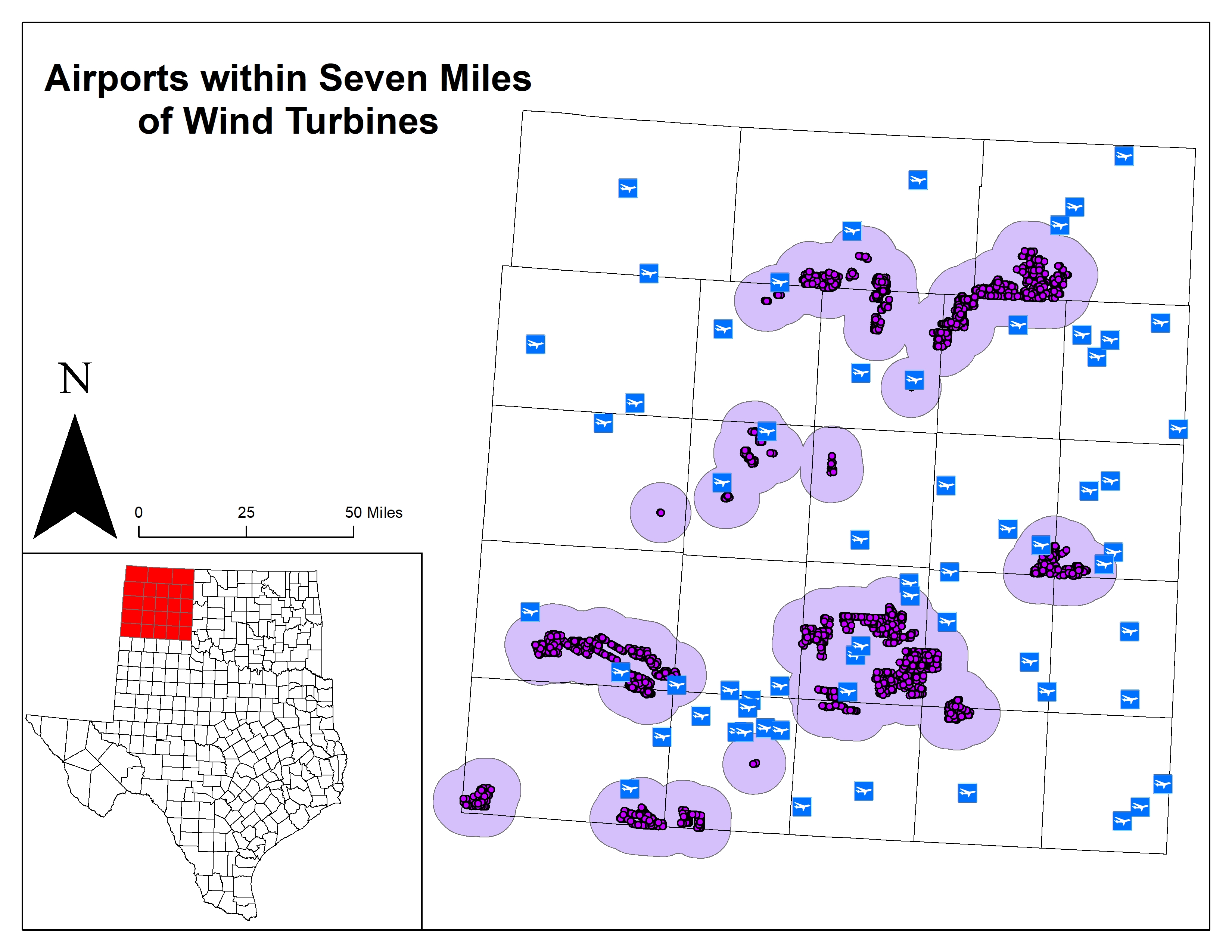
A basis for further data collection through results and conclusion:
As a result, this project provides the user a geoprocessing program with the ability to view and anlayze the various patterns in determining wind turbine placement and provide some useful information for planners and engineers to aid in decision making. For those who want to research further and continue with the project, I may suggest adding a little more detail at the local level such as road networks and local demographic information.